The complete platform

Everything Glassio does, on one page.

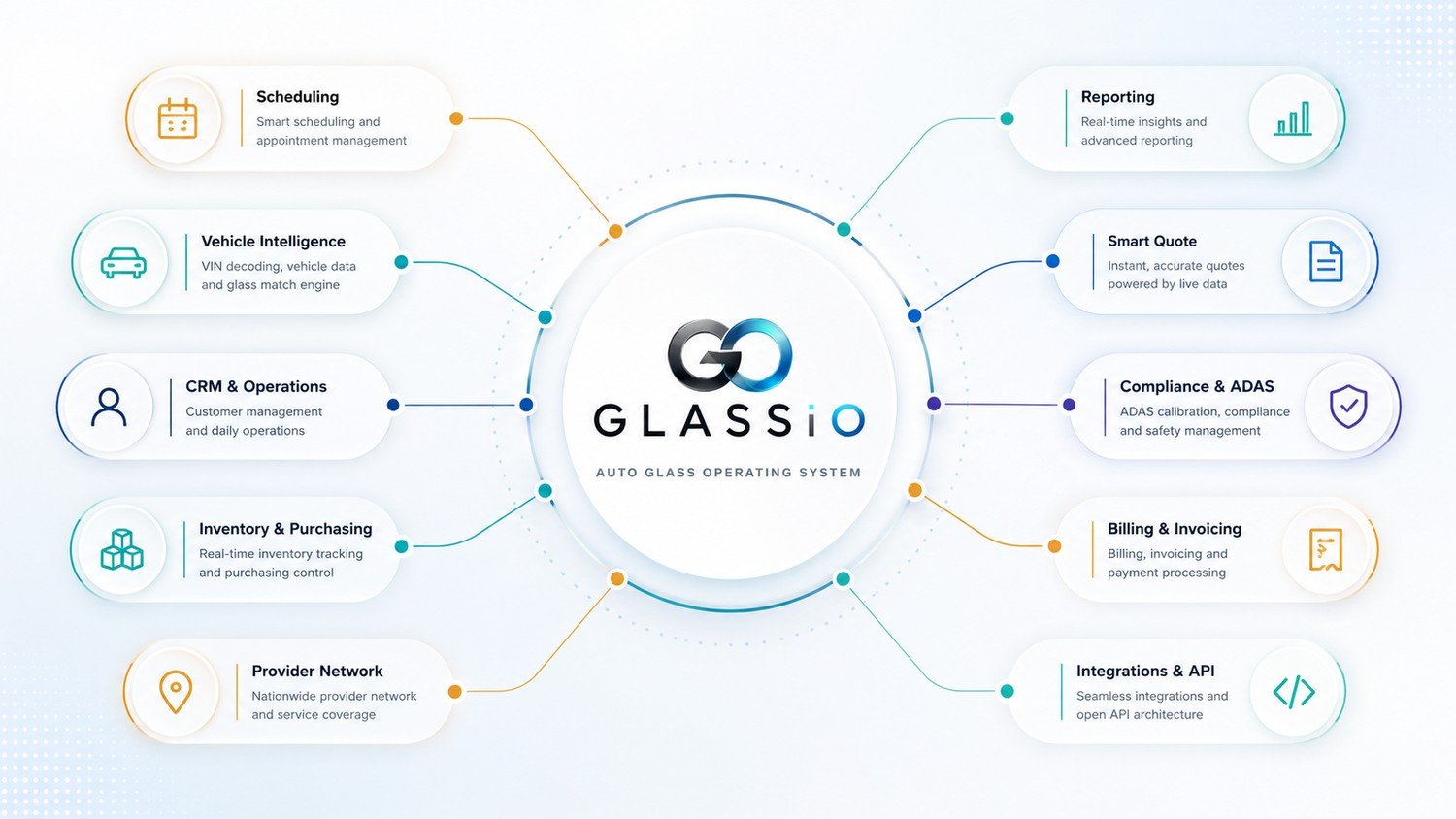
Six pillars. 33 capabilities. One system that quotes the job, identifies the glass, schedules the work, documents the install, orders the part, sells to retail and wholesale customers, bills it, and reports on all of it.

6Platform pillars
33Capabilities
1Connected system
app.glassio.io
Glassio auto glass management dashboard
The map

One operating system, not eight tools

Each function below writes to the same customer, vehicle, and job record. Pick any one to jump straight to it.

Pillar 01

Turn a website visitor into a priced, booked job

Quoting is where money is won or lost. Glassio prices from the real vehicle and your real cost, captures the lead whether or not the customer finishes, and protects the pricing from everyone who is not a customer.

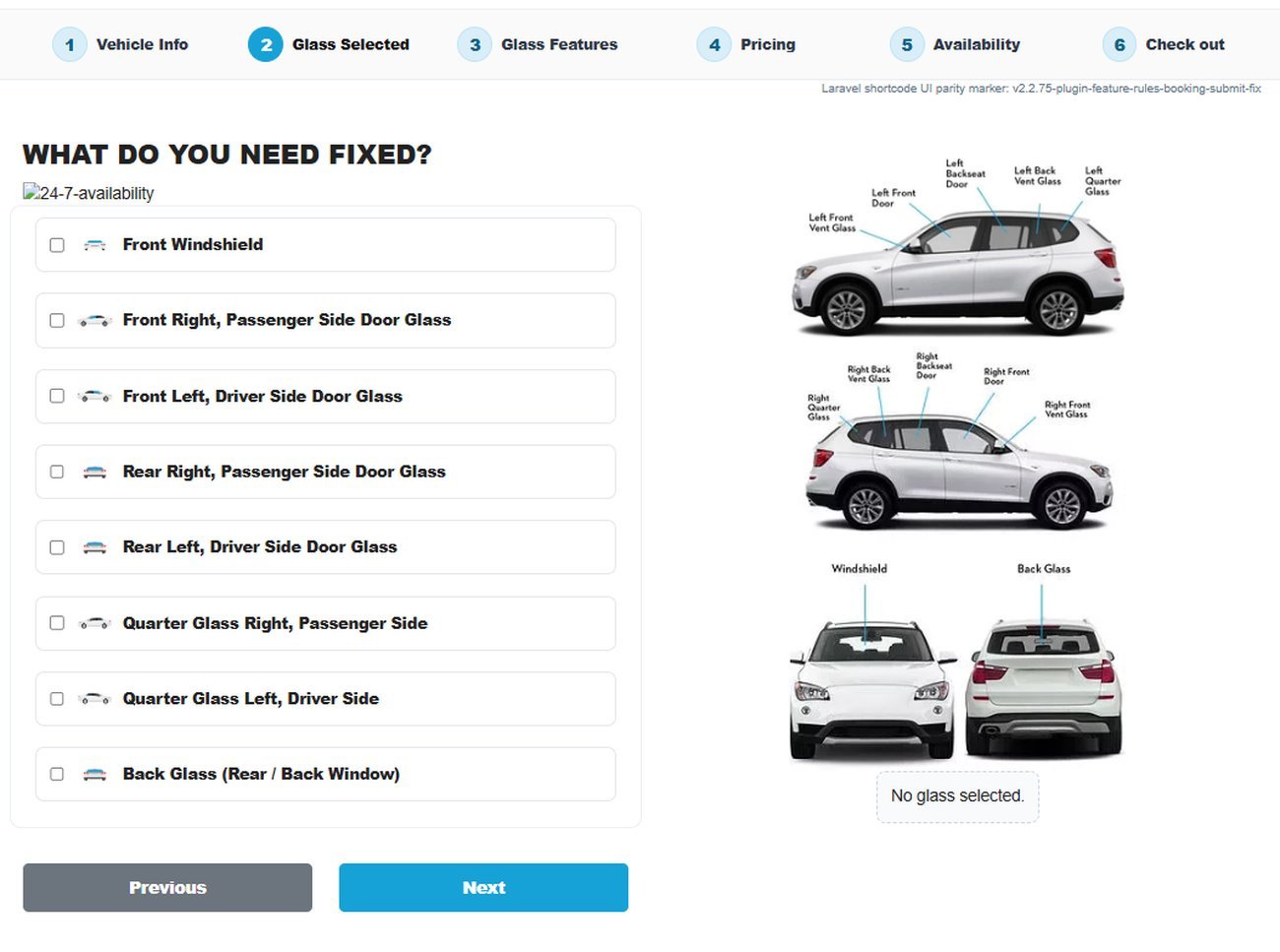
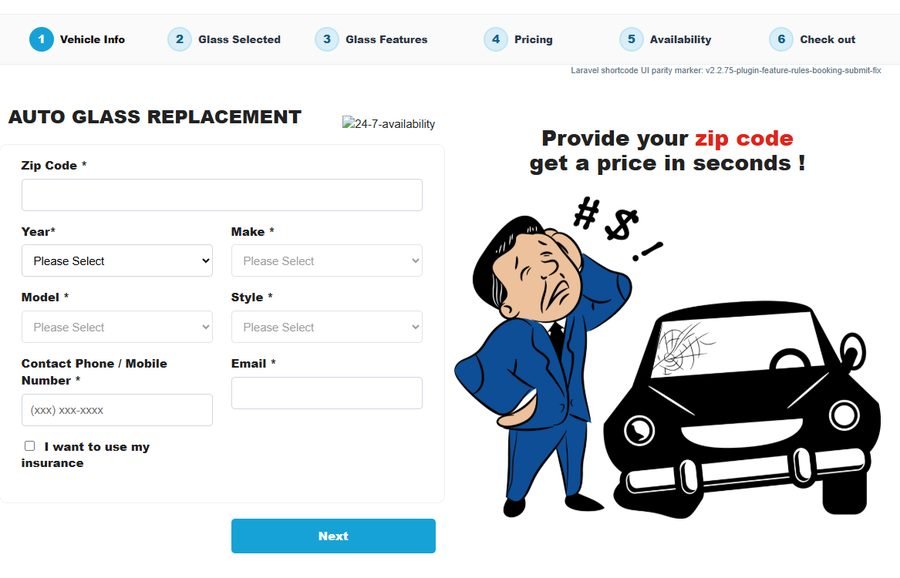
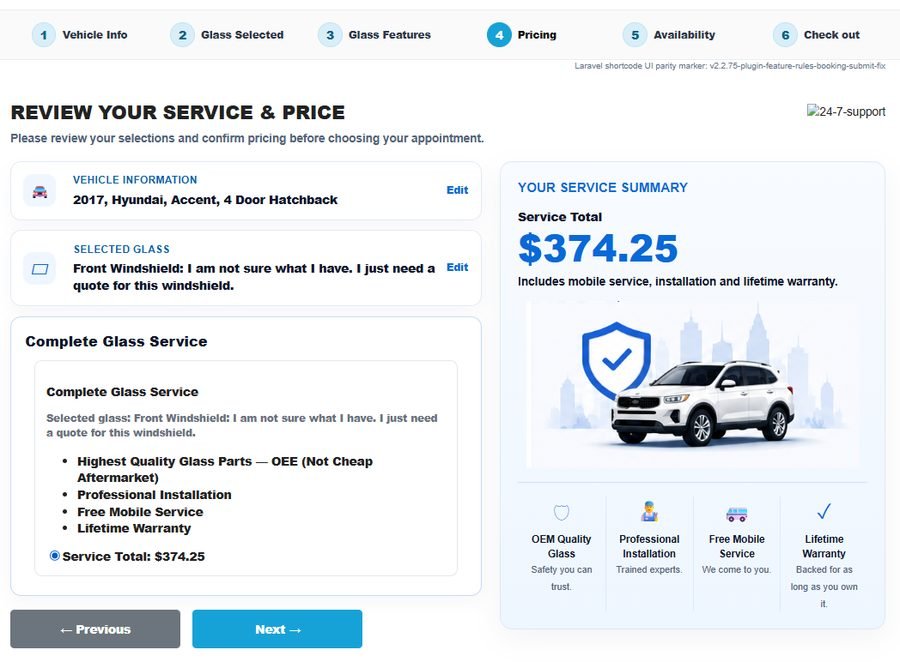
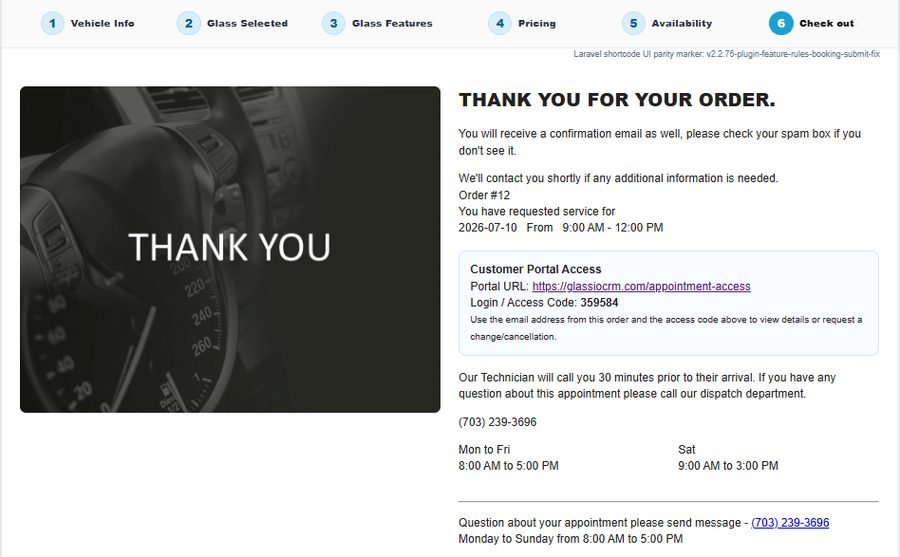
The hosted online quote page customers see

Smart Quote engine

A guided online quote that ends in a booked appointment.

  • Vehicle chosen by VIN, plate, or year/make/model — not a broad menu
  • Glass type and features resolved before a price is shown
  • ZIP and service-area validation so you never quote a job you cannot serve
  • Customer books shop or mobile service directly into the calendar

Advanced pricing engine

A number built from your cost, not a static list table.

  • Supplier cost and NAGS reference pricing applied through your own rules
  • Labor rules and ADAS recalibration folded in automatically
  • Urethane, moldings, consumables, and mobile fees by zone
  • Tax logic plus margin controls that protect the job

Pricing profiles

Different channels, different math — configured once.

  • Retail and online pricing
  • Wholesale and customer-group rates
  • Insurance pricing paths where applicable
  • Rules standardized across every location

Lead capture & recovery

Nothing leaves the site without becoming a lead.

  • Customer and vehicle saved the moment they are entered, finished or not
  • CRM lead created automatically
  • Automated follow-up email on unfinished quotes
  • Customer resumes where they stopped instead of starting over

Visitor tracking & quote protection

See who is quoting you, and stop who should not be.

  • Quote activity tracked by visitor and session
  • Rate limiting on vehicle and part lookups to stop catalog scraping
  • Block rules for abusive traffic, bots, and competitors
  • Embed on your own site with the quote locked to your domain

Hosted quote pages

A quote page even without a website of your own.

  • Hosted page branded to your business
  • Shareable link for social, ads, and Google listings
  • Same engine, same pricing, same CRM destination
  • Provider Network intake feeds the same pipeline
Step 1 — vehicle and ZIP
Step 2 — review and price
Step 3 — booked
Step 3 — booked
Smart Quote — in depth

One platform, four jobs

A quote form collects a name and hopes for a callback. The Smart Quote Platform runs the whole acquisition cycle — pricing the job accurately, capturing the lead, winning back the ones that stall, and protecting the system from abuse.

Pricing accuracy

Supplier-cost pricing, ADAS, labor, and margin rules build a number you can stand behind.

Lead generation

Website forms, hosted quote pages, and Provider Network intake feed straight into your CRM.

Lead recovery

Unfinished quotes are saved and re-engaged with automated follow-up, not lost forever.

Quote protection

Activity monitoring and blocking tools keep bots, scrapers, and abuse out of your pricing.

Why most online glass quotes fall apart

A quote is only useful if it's right. Generic calculators lean on static tables and broad vehicle choices, so the number a customer sees rarely survives contact with the actual job.

The customer has to guess

Year, make, and model isn't enough. Two of the same truck can take different glass depending on camera, HUD, and sensor options.

List price ≠ your cost

Pricing off NAGS list alone ignores what you actually pay a supplier, so estimates run too high, too low, or inconsistent.

ADAS gets handled later

Calibration is often bolted on after the quote by phone, which turns a clean estimate into an awkward callback.

Leads leave and never return

Most visitors don't finish. Without capture and follow-up, every unfinished quote is a lead lost for good.

No service-area logic

Mobile fees and out-of-area jobs get quoted the same as a shop appointment — or booked when you can't serve them.

Wide open to abuse

Bots, scrapers, and competitors hammer unprotected quote tools, burning resources and skewing your data.

Every accurate quote starts with the vehicle

Before a price makes sense, Glassio has to know exactly what's in the driveway. VIN and plate decoding, feature detection, and the Glass Match Engine pin down the details that actually change the part.

VIN & plate decode

Vehicle identity resolved from the VIN, with plate-to-VIN lookups where enabled.

ADAS & HUD detection

Driver-assistance, heads-up display, and rain-sensor awareness that affect the part and calibration.

Glass Match Engine

The specific windshield or door glass matched against the catalog — not a broad category.

Knowledge network

Fitment knowledge that improves matching accuracy across vehicle families.

The advanced pricing engine

Pricing draws on configurable sources and rules so the online number reflects the real job — not a static table. Every input below can be part of the calculation.

Supplier and reference pricing depend on configured integrations, account credentials, availability, and enabled workflows.

Configurable pricing sources

Supplier cost and NAGS reference pricing where applicable, applied through your rules.

Labor & ADAS calibration

Labor rules and calibration charges folded into the estimate automatically.

Materials & mobile fees

Urethane, moldings, consumables, and mobile-service fees by zone.

Taxes & margin rules

Tax logic plus business margin controls that protect profitability.

Customer-specific pricing

Account and customer-group rates for wholesale and repeat relationships.

Insurance workflows

Insurance-related pricing paths where applicable.

Different channels, different math — set once

Pricing profiles define how estimates are calculated across channels and customer types, so an online lead, a wholesale account, and an insurance job each follow their own rules.

Quote breakdown

2021 Ford F-150 · windshield · mobile install Example structure only. Actual totals depend on business configuration.

Turn abandoned quotes into revenue

Most website visitors never finish an online quote — interrupted at work, waiting on insurance, comparing prices, or just distracted. Most auto glass sites lose those prospects forever. Glassio doesn't.

Captured the moment it's entered

Customer and vehicle details are saved as soon as they're provided — even if the quote is never completed — so the lead exists whether or not they finish.

Recovered, not restarted

Automated follow-up emails re-engage unfinished requests, and customers can return to continue from where they left off instead of starting over.

A self-service portal that reduces phone calls

After requesting a quote or booking service, customers get a secure portal to manage their own request — reviewing details, updating information, and staying in touch without tying up your office.

The estimate doesn't die in an inbox

An accepted quote flows into records, scheduling, inventory, invoicing, and reporting — so a lead becomes a booked, billed job without re-keying anything.

Part checked and reserved where connected.

Common questions

Is this just a fancy online quote form?

No. The Smart Quote Platform connects a customer's request to vehicle intelligence, the Glass Match Engine, configurable pricing, service-area logic, lead capture and recovery, a customer portal, quote-abuse protection, and the operational workflows behind them.

Can Glassio price from supplier cost instead of only NAGS list?

Yes. Glassio is designed to support supplier-cost-based pricing when supplier integrations and account credentials are configured. Pricing sources are configurable rather than fixed to list pricing.

What happens when a customer is outside my service area?

Glassio validates the location against your configured ZIP/territory coverage first. Inside your area, it continues to a full estimate; outside it, it shows a custom message instead of quoting or booking a job you can't reach.

What if a customer doesn't finish their quote?

Customer and vehicle information is captured as soon as it's entered, so the lead is saved even when the quote isn't completed. Automated follow-up can re-engage them, and they can resume where they left off.

How does quote protection work?

Glassio can monitor quote activity, flag suspicious or excessive usage, and apply temporary or permanent IP/email restrictions with administrator review — keeping the tool available for legitimate customers. (The Quote Trust Score reputation layer is on the roadmap.)

Can the platform run on my own website?

Yes. Glassio quote experiences can power shop websites, standalone landing pages, hosted quote pages, and Provider Network workflows.

Can a quote become a scheduled job?

Yes. Accepted quotes can flow into customer records, scheduling, inventory, invoicing, and reporting, and customers can manage the rest through the portal.

Pillar 02

Know exactly what glass the vehicle takes

Two identical-looking trucks can take different windshields. Vehicle Intelligence resolves the vehicle and its glass-relevant options first, so every quote, order, and install downstream is built on the right part.

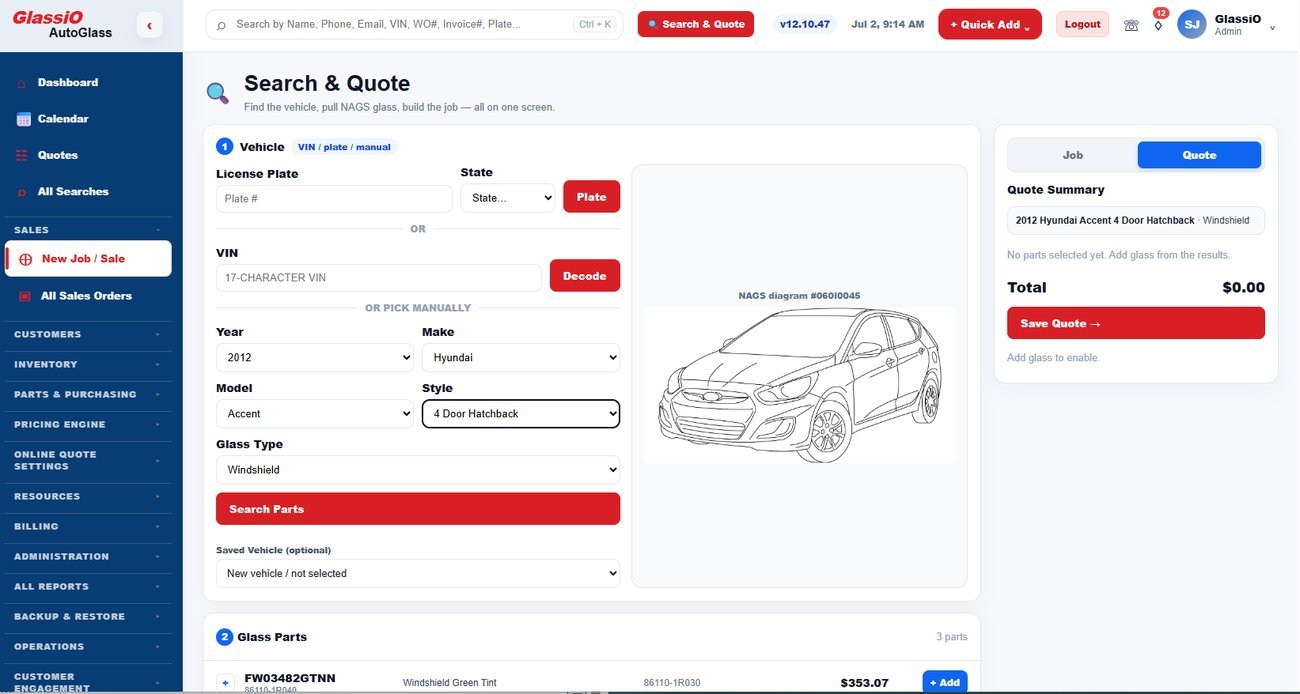
Search & Quote — vehicle resolved, parts matched, priced

VIN search

Full vehicle identity from the VIN.

  • Year, make, model, trim, body, and build detail
  • Glass-relevant options pulled from the decode, not assumed
  • Results cached, with a force-live option when you need a fresh read
  • Every decode traceable — you can see which providers answered

Plate search

Start from a plate when the customer cannot find the VIN.

  • Plate-to-VIN lookup by state where enabled
  • Falls through to the same decode and matching path
  • Keeps phone intake moving instead of stalling on the windshield corner

Feature detection

The options that actually change the part.

  • ADAS and forward-facing camera, lane departure
  • Heads-up display, rain and humidity sensors
  • Heated wiper park, acoustic interlayer, solar coating
  • Evidence-based: a feature is only ruled in or out when it is proven

Glass Match Engine

The specific part number, not a category.

  • Matches against the full catalog rather than a broad glass type
  • Ranks candidates by the evidence behind them
  • Confirm the correct part once and the system remembers it for that vehicle
  • Accuracy improves across vehicle families as confirmations accumulate

Reverse part lookup

Start from the part and work backwards.

  • Enter a part number and see the vehicles it fits
  • Interchange and cross-reference across supplier catalogs
  • Useful for stock on the shelf, returns, and customer call-ins
  • Same catalog the quote engine and storefront use
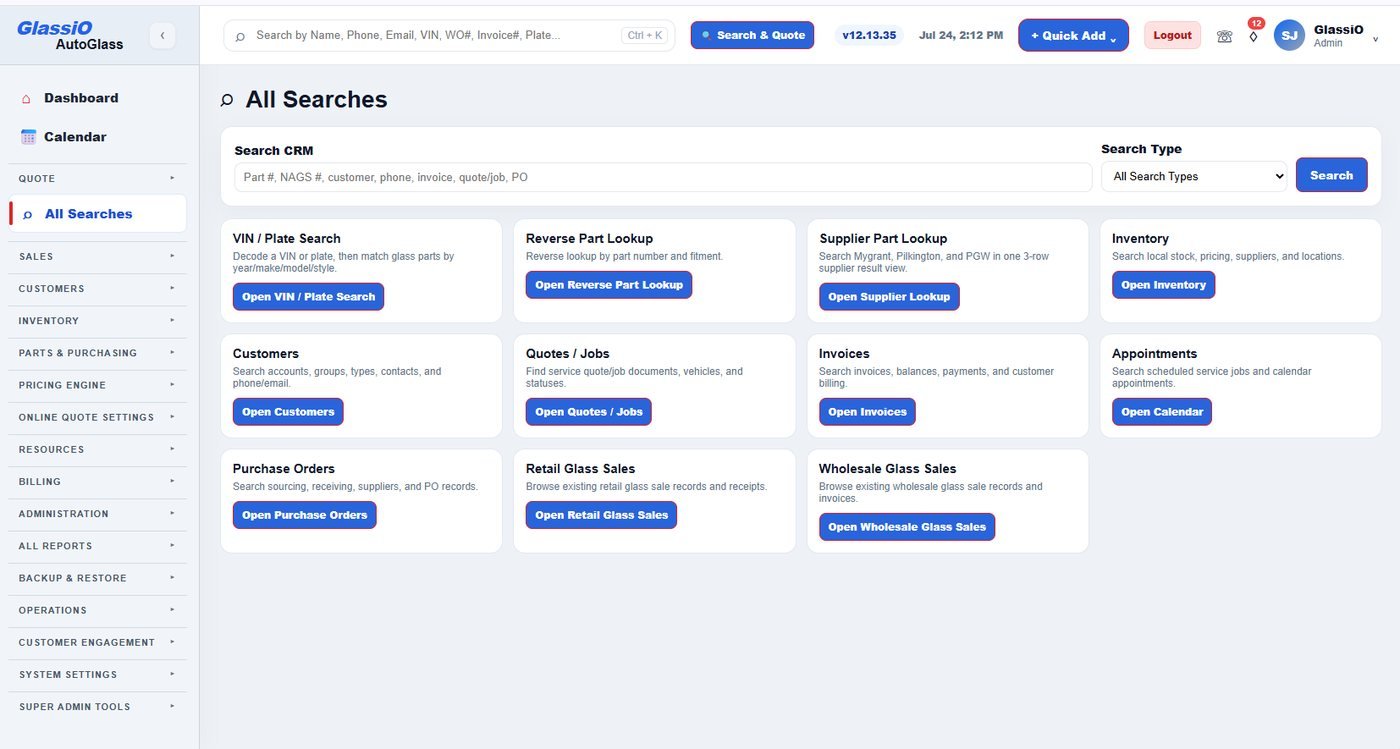
All Searches — VIN/plate, reverse part lookup, and supplier part lookup in one place
Vehicle Intelligence — in depth

Vehicle data is not just a lookup. It affects the whole job.

In auto glass, a vehicle record is the starting point for almost every operational decision. A basic year, make, model, and style can help identify a vehicle, but it does not tell the full story. Modern windshields may depend on ADAS cameras, HUD, rain sensors, lane departure systems, heated areas, acoustic glass, bracket requirements, moldings, and supplier availability. When that information is disconnected, teams spend time calling suppliers, correcting quotes, reworking orders, and explaining surprises to customers.

Glassio treats vehicle data as an operational layer. The decoded vehicle, detected features, candidate glass parts, supplier context, job requirements, and documentation steps are connected into the same workflow. That means the intelligence captured at intake can continue through quote, schedule, inventory, install, invoice, reporting, and future validation.

Quoting

Better intake context helps teams quote with the right assumptions and fewer manual corrections.

Part Selection

Feature signals help narrow candidate glass parts instead of forcing staff to rely only on memory.

Scheduling

ADAS and calibration awareness can affect appointment type, location, and service time.

Inventory

Vehicle intelligence can trigger availability checks, reservations, and purchase needs before the job date.

Compliance

Documentation tasks can be connected to detected feature and job requirements.

Reporting

Vehicle and feature data becomes searchable operational history instead of isolated notes.

VIN decode turns a vehicle identifier into usable workflow context.

The VIN is often the fastest way to start a quote or service order. Glassio uses VIN decode to populate core vehicle information, reduce manual entry, and prepare the record for deeper glass-related evaluation. The goal is not only to identify the vehicle; the goal is to move the job forward with better context for quoting, scheduling, supplier review, and documentation.

Capture VIN

A CSR, customer, installer, or imported lead provides the VIN during intake or job review.

Decode vehicle

Glassio converts the VIN into structured year, make, model, trim, body, and available vehicle details when provider data is available.

Detect signals

Glassio looks for glass-relevant signals such as ADAS, HUD, rain sensor, heated glass, lane departure, and related terminology.

Prepare job context

Decoded data flows into quote fields, service order notes, inventory review, compliance prompts, and reporting.

Save intelligence

Search history, evidence, selected parts, and user validation can be retained for future operational learning.

Plate decode helps teams start faster when customers do not have the VIN ready.

Many customers do not know where to find the VIN, especially during a phone call or online quote. Plate decode can reduce friction by converting a license plate and state into a VIN when supported by the provider. Once the VIN is found, Glassio can continue through the same Vehicle Intelligence workflow.

Lower-friction intake

Customers can start with plate and state instead of searching for a VIN.

Faster CSR workflow

Phone staff can move from customer request to vehicle record with fewer manual questions.

Connected pipeline

Plate-derived VINs can continue into feature detection, quote creation, inventory review, and scheduling.

Audit visibility

The source of vehicle data should remain visible so staff know whether the VIN was customer-entered, plate-derived, or manually corrected.

Detect the features that matter to glass selection and job planning.

Glassio focuses on feature signals that matter in auto glass operations. The platform is designed to help teams recognize when a vehicle may involve advanced driver assistance systems, heads-up display, rain sensor, heated glass, lane departure technology, condensation sensors, acoustic glass, or other glass-related attributes that can affect quoting, part review, calibration workflow, and installation planning.

ADAS

Camera and driver assistance indicators that may require calibration workflow visibility.

HUD

Heads-up display signals that can affect windshield selection and customer expectation.

Rain Sensor

Sensor-related language that may affect part qualification and installation notes.

Lane Departure

Lane departure and camera-based terminology that can indicate ADAS-related requirements.

Heated Glass

Heated windshield or heated wiper area signals that may affect candidate parts.

Acoustic / Solar / Specialty

Special glass attributes that may appear in supplier, OEM, or catalog descriptions.

The Glassio Match Engine connects evidence to action.

Generic lookup tools often stop after returning a vehicle or a list of possible parts. Glassio is designed to go further. The Glassio Match Engine organizes vehicle data, feature signals, supplier and catalog context, evidence registries, and validation history into a structured evaluation workflow. The purpose is to help auto glass teams narrow uncertainty, review candidate glass parts, and decide what should happen next.

Evidence-based selection

Candidate parts should be filtered and promoted by evidence, not guessed into the final result.

Review when needed

If provider data is incomplete, the system should show why review is needed and what evidence is missing.

Learning loop

Validated searches and confirmed decisions can strengthen future knowledge workflows.

Part matching belongs inside the operational workflow.

Glassio is built for the way auto glass businesses work with supplier, catalog, and part data. The platform can support workflows around NAGS-related part review, supplier candidates, OEM references, availability checks, purchase orders, and user validation. The goal is to reduce rework by keeping vehicle intelligence, candidate review, inventory, and purchasing in the same operating system.

Supplier context

Supplier integrations and product data can help teams move from quote to availability review and ordering.

Candidate review

Candidate glass parts should remain visible when review is required, with reasons and evidence shown clearly.

Operational validation

Confirmed part selections can be saved with the vehicle and job history for future reference.

Purchasing connection

When a part is selected or inventory is short, the workflow can lead into reservation or purchase order activity.

Candidate Parts

Next Workflow

Common questions

Is Glassio just a VIN decoder?

No. VIN decode is one input into the Vehicle Intelligence Center. Glassio is designed to connect vehicle data to feature detection, candidate review, quote workflow, inventory, scheduling, compliance prompts, billing, and reporting.

Can Glassio decode license plates?

Glassio supports a plate-to-VIN workflow where provider access is available. This helps customers and staff start intake faster when the VIN is not immediately available.

Does Glassio guarantee the correct windshield part every time?

No software should claim that without proper validation. Glassio is designed to organize evidence, highlight confidence and uncertainty, support candidate review, and preserve confirmed decisions so teams can operate with better information.

How does Glassio handle ADAS, HUD, rain sensor, and similar features?

Glassio is designed to detect and standardize feature signals from vehicle data, supplier context, terminology, and validation history so teams can review glass-related requirements earlier in the workflow.

Does Glassio perform calibrations or certify compliance?

No. Glassio does not perform calibrations and does not certify compliance. It supports compliance-related operational workflows such as documentation tracking, calibration status visibility, and process accountability.

How does Vehicle Intelligence connect to inventory and purchasing?

Vehicle and part context can flow into inventory review, reservation workflows, supplier availability review, and purchase order activity so teams can prepare before the job date.

Can teams override or validate results?

Yes. A strong operating system should preserve user review and validation. Confirmed outcomes can be retained as operational history and used to support future decisions.

Who benefits most from Vehicle Intelligence?

Mobile installers, auto glass shops, distributors, and enterprise teams all benefit because vehicle intelligence affects quoting, scheduling, inventory, documentation, and customer communication.

Pillar 03

One record from first call to final invoice

A customer record is only useful when it is attached to the job. Quotes, service orders, scheduling, the technician in the field, and the customer at home all read and write the same record.

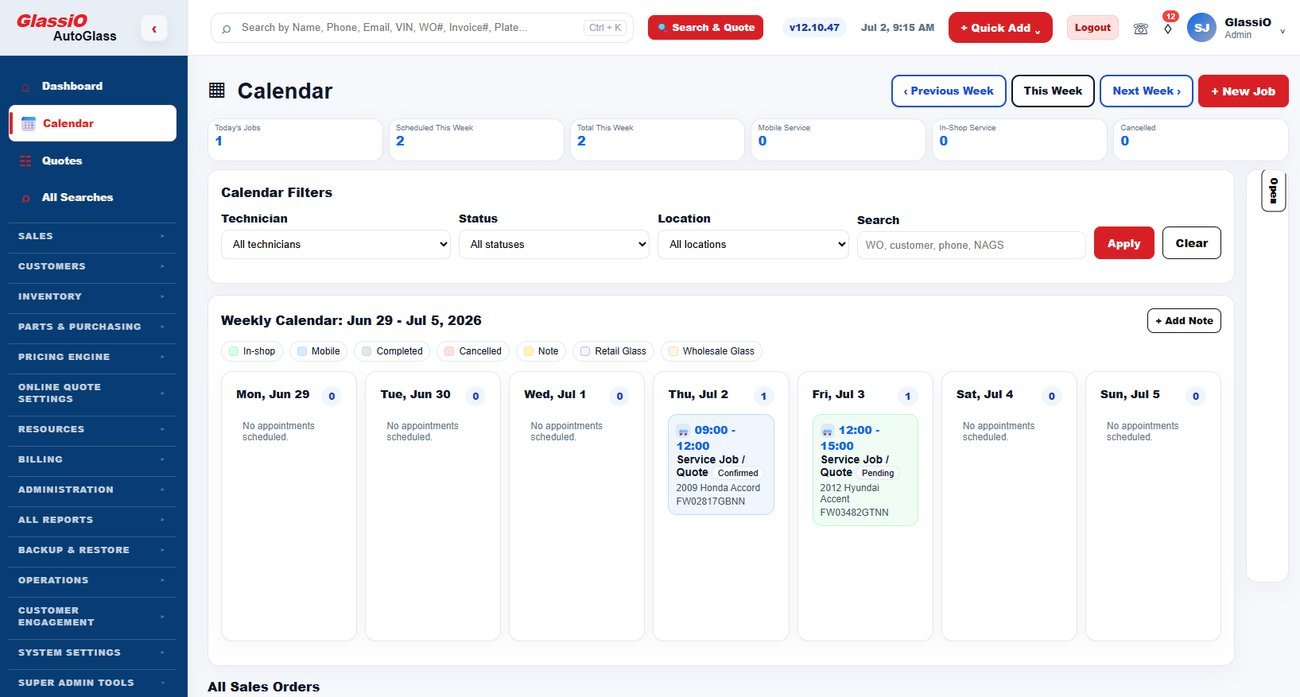
Calendar and sales orders — jobs moved and reassigned visually

Customer & vehicle records

The full service context on one screen.

  • Customers, vehicles, contacts, and accounts
  • Every quote, job, invoice, and note in one history
  • Insurance and fleet account relationships
  • Search across customers, vehicles, quotes, and orders from anywhere

Search & Quote

Intake becomes a structured, priced quote.

  • Vehicle resolved, parts matched, price built in one flow
  • Quote converts to a service order without re-keying
  • Shop, mobile, wholesale, and insurance paths from the same screen

Scheduling

Book the job against the people and hours you actually have.

  • Shop bays and mobile routes
  • Technician assignment with workload visibility
  • Service-area and travel-time awareness
  • Customer notifications on booking and changes

Calendar & visual job view

Move work without opening a form.

  • Day and month views of the whole operation
  • Drag a job to a new time or a different technician
  • Status changed inline as work progresses
  • Technician workload matrix so nobody is double-booked

Customer online portal

Customers handle their own request instead of calling.

  • Secure customer login
  • Quote and appointment status, service history
  • Request changes or a reschedule
  • Upload vehicle photos and submit or correct the VIN
  • Add notes and access instructions before the tech arrives

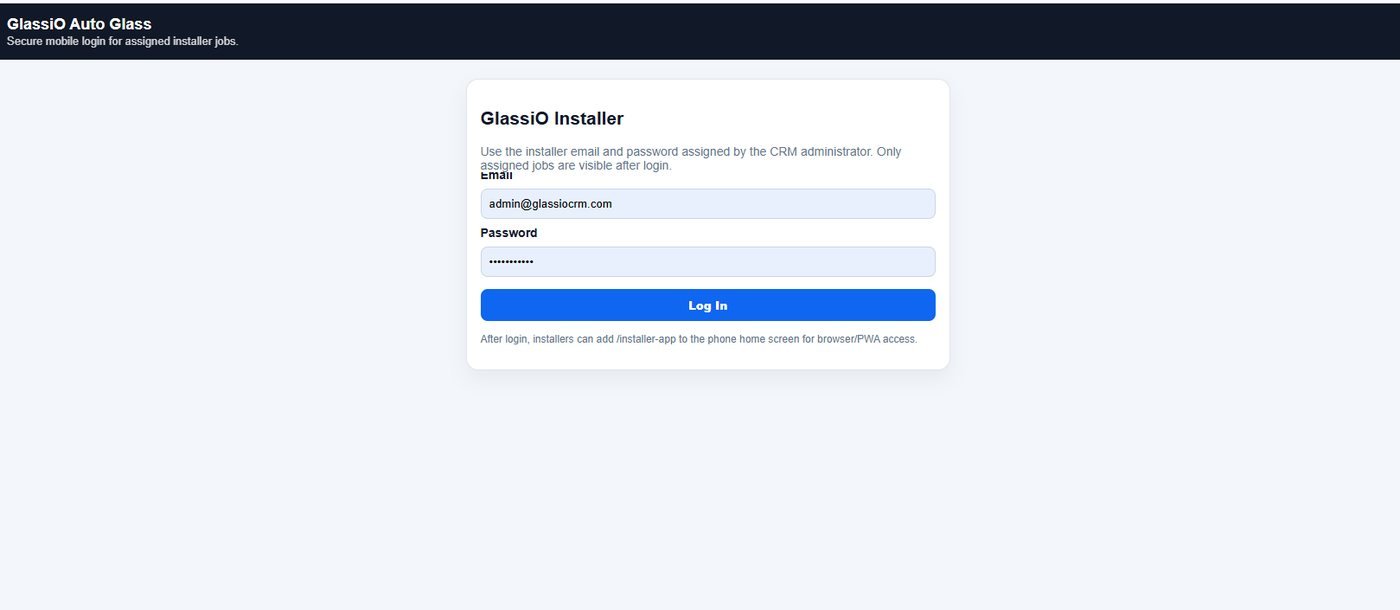
Technician portal

Documentation captured at the vehicle, not remembered later.

  • Runs on the phone or tablet the tech already carries
  • Pre-work capture: vehicle and damage photos, VIN photo, existing condition
  • Post-installation capture: finished photos, part used, notes
  • Customer signature on the job
  • Compliance and ADAS documentation attached to the job automatically
  • Everything lands on the job record the office and customer already see
Technician portal — secure mobile login, assigned jobs only
CRM & Operations — in depth

A customer record is only useful when it is connected to the job.

In auto glass, customer management is not just name, phone number, and email. Every customer interaction depends on the vehicle, the glass part, ADAS and feature indicators, appointment type, technician availability, supplier context, insurance or retail pricing, documentation, invoice status, and follow-up communication.

Generic CRM tools usually stop at contact history. Glassio extends the customer record into a complete operational workspace.

Generic CRM

Stores contacts, notes, tasks, and basic sales activity.

Glassio Operations

Connects customers to vehicles, quotes, jobs, schedules, invoices, and reporting.

Every customer profile carries the full service context.

A profile should make it easy to move from customer intake to quote, from quote to service order, and from invoice to reporting without losing context.

Customer Profile

Designed for the front office and the back office.

CSRs, managers, installers, accounting, and owners all need different parts of the same customer story. Glassio keeps that story connected to the work.

Turn customer intake into structured quotes and service orders.

When a customer calls, submits an online quote, or comes through the provider network, Glassio helps turn that inquiry into a structured workflow. Customer details, vehicle information, glass category, features, pricing rules, appointment preference, and communication history stay connected.

1. Intake

Capture customer, vehicle, source, service need, and contact preference.

2. Quote

Build pricing with vehicle, feature, part, labor, and tax context.

3. Service Order

Move approved work into scheduling, job status, inventory, and billing.

Scheduling stays connected to the customer and the job.

A scheduled job is not just a calendar block. It needs customer contact information, vehicle details, service location, part requirements, appointment window, technician assignment, job notes, inventory status, and communication updates.

Dispatch Board

Billing is part of the customer workflow.

Teams need visibility into estimates, approved quotes, invoices, payment links, balances, refunds, tax treatment, and reporting status. Glassio keeps billing connected to the customer and job record.

Every role sees the context they need.

The same connected record supports CSRs, managers, installers, accounting, and owners without forcing every team to work from separate spreadsheets, texts, inboxes, or memory.

CSR

Intake, quote follow-up, appointment confirmation, and customer communication.

Manager

Job status, exceptions, workload, schedule visibility, and next actions.

Installer

Service details, location, notes, vehicle context, and task status.

Accounting

Invoice status, payment links, balances, and customer financial history.

Owner

Pipeline, job volume, revenue, customer activity, and operational reporting.

Bring compliance-related workflows into daily operations.

Glassio gives auto glass businesses a connected way to manage the operational pieces that support compliance-minded work.

Documentation Tracking

Keep photos, notes, acknowledgements, completion records, and job documentation connected to the service order.

Safe Drive-Away Oversight

Support release-readiness workflows with cure-time visibility, checklist status, and job-level notes.

Calibration Workflow Visibility

Track calibration-related task status, open steps, completion indicators, and items requiring review.

Vehicle Intelligence Integration

Use VIN, plate, feature detection, and vehicle indicators to improve planning before the job starts.

Compliance Reporting

Surface missing documents, exceptions, open tasks, and operational metrics for management review.

Audit Readiness

Maintain structured job records so teams can review what happened, when, and where follow-up may be needed.

A connected foundation for enterprise workflows and custom systems.

Glassio APIs support enterprise workflows, custom applications, reporting systems, third-party integrations, technology partners, and business intelligence needs.

/jobs

Visual placeholder for job workflow connectivity.

/vehicles

Visual placeholder for vehicle data workflows.

/inventory

Visual placeholder for stock and purchasing workflows.

/invoices

Visual placeholder for billing and payment workflows.

Common questions

Is Glassio only a CRM?

No. Glassio includes CRM and customer management, but CRM is one module inside the broader Auto Glass Operating System. The customer layer connects to vehicle intelligence, quotes, scheduling, inventory, compliance-related workflows, billing, reporting, and provider network activity.

Can Glassio manage both retail and insurance-related customer workflows?

The page should position Glassio as supporting structured customer, quote, job, and billing workflows. Specific insurance workflow details should be configured in the product and implementation content, not overclaimed on the marketing page.

Does online quote activity flow into the customer record?

Yes. The intended website message is that online quote requests, hosted quote page activity, and marketplace leads should become operational records rather than disconnected form submissions.

Can managers see job status from the customer record?

Yes. The CRM & Operations page should show that customer records connect to quotes, service orders, scheduling, job status, invoices, and reporting context.

How is this different from a generic CRM?

Generic CRM tools focus on contacts and sales activity. Glassio is built around auto glass operations, including vehicles, glass decisions, scheduling, supplier context, inventory, documentation, billing, and reporting.

Who should use this page?

This page is written for auto glass shops, mobile installers, distributors, and enterprise teams evaluating how customer management connects to daily operations.

Pillar 04

The part is there when the job is

Inventory that does not know about the schedule causes the same two failures forever: a job with no glass, and a shelf full of glass no job needs. Glassio drives purchasing from real, dated demand.

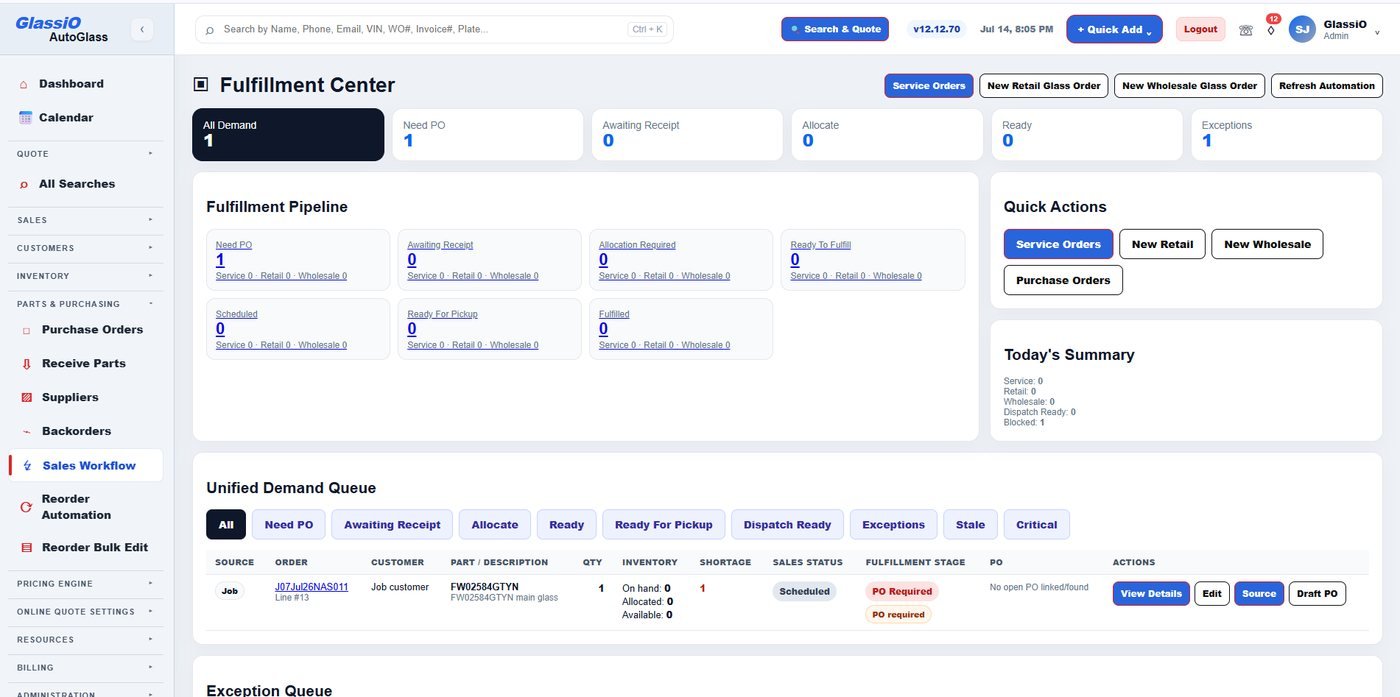
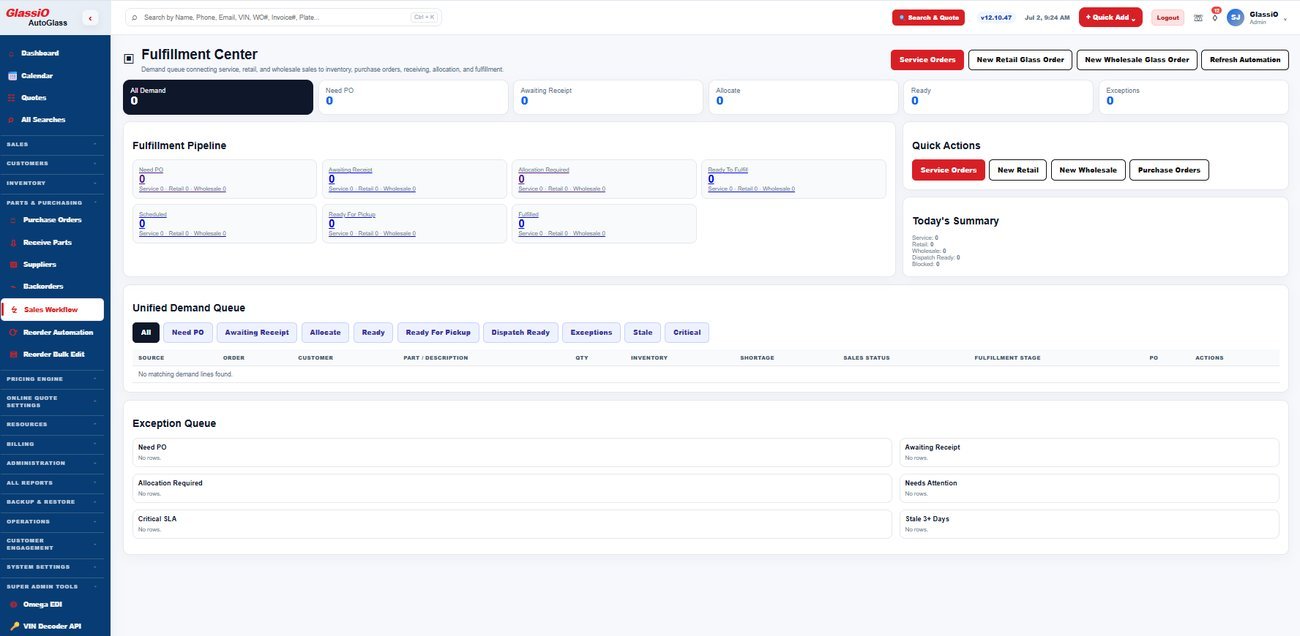
Fulfillment Center — unified demand queue across service, retail, and wholesale orders

Inventory & locations

Stock tracked where it actually sits.

  • Multi-location and warehouse stock levels
  • Part-level detail matched to the glass catalog
  • Adjustments, transfers, and counts
  • Reorder thresholds by location

Fulfillment center

Every scheduled job and what it still needs.

  • Demand generated by real service orders
  • Parts reserved against the job that needs them
  • Shortages surfaced before the install date, not on the morning of
  • One screen from job demand to job-ready

Purchase orders

Buying that keeps the job attached.

  • POs raised from real demand or manually
  • Receiving against the PO with partials
  • Costs land back on the job and the margin
  • Full PO history by supplier

Supplier direct ordering

Order from inside the CRM.

  • Live cost and availability from connected supplier accounts
  • Order placed without leaving the job
  • Supplier cost feeds the pricing engine so quotes stay honest
  • Multiple supplier accounts and preference rules

Returns & credits

Close the loop on the glass that goes back.

  • Supplier returns tracked to credit
  • Reason coding and breakage records
  • Credits reconciled against the original purchase

EDI

Machine-to-machine documents instead of PDFs and phone calls.

  • Inbound document parsing including remittance and acknowledgement sets
  • Supplier connection management
  • Documents matched to the orders and invoices they belong to
Fulfillment pipeline — every job and what it still needs
Inventory & Purchasing — in depth

Disconnected inventory creates missed installs, rushed orders, and expensive mistakes.

Auto glass inventory is not simple retail inventory. A windshield may be tied to a specific vehicle build, feature set, supplier part, molding, adhesive requirement, calibration workflow, and scheduled technician. If the part is not available when the job begins, the entire operation slows down.

Spreadsheets and generic inventory tools usually separate stock from quoting, scheduling, purchasing, receiving, and billing. That separation forces the team to verify everything manually: whether the right part was selected, whether it is in stock, whether it was already promised to another job, whether a purchase order was placed, and whether the part was received in time.

Parts appear available but are already needed for another job.

Track the materials that matter to real auto glass work.

Glassio inventory is designed for the way auto glass companies manage operational materials. The system can organize glass parts, moldings, clips, adhesives, urethane, primers, tools, consumables, supplier part references, stocking locations, and job-related usage.

Instead of treating every item as a generic SKU, Glassio supports inventory views that make sense to auto glass teams: part numbers, categories, supplier references, locations, cost, availability, reserved quantity, reorder needs, and job connection.

Glass parts

Windshields, door glass, back glass, quarter glass, vent glass, and other job-critical items.

Moldings and clips

Related materials that can delay installation when not planned with the glass part.

Adhesives and consumables

Urethane, primers, cleaners, tape, blades, and install materials tied to job readiness.

Supplier references

Supplier item numbers, purchase cost, vendor availability, and ordering context where integrations are available.

Locations and movements

Shop stock, mobile stock, receiving, transfers, returns, and usage history.

Operational alerts

Low stock, reserved stock, unreceived POs, pending supplier orders, and missing materials.

Reserve inventory for the jobs that already need it.

A part that is on the shelf is not always available. It may already be needed for tomorrow morning, assigned to a mobile installer, waiting for calibration workflow review, or planned for a customer appointment. Glassio is designed to help shops connect inventory availability to actual job demand.

Job-aware reservations give managers a clearer view of what can truly be sold, what should be protected for scheduled work, and what must be ordered before the install date. This is a major difference between a basic inventory list and an auto glass operating system.

Reserve glass and related materials against a quote, service order, or scheduled job.

Turn operational demand into purchase orders without losing context.

Purchasing should not start after a job is already at risk. Glassio is designed to help teams see what needs to be ordered, connect purchase orders to suppliers, track receiving status, and keep job context visible throughout the process.

When inventory, job scheduling, and supplier activity live in the same operating system, the team has a better chance of ordering the right item, for the right job, at the right time.

Identify demand

Quotes, scheduled jobs, low stock alerts, and reservations reveal what needs attention.

Create purchase order

The purchasing user can build a PO with supplier, item, quantity, cost, and job context.

Track supplier status

Open, submitted, partially received, backordered, cancelled, or completed statuses keep the team aligned.

Receive and update stock

Received items update inventory and can move jobs from at-risk to ready.

Report and reconcile

Purchasing cost, usage, and supplier activity feed operational reporting.

Connect supplier workflows to quoting, inventory, and purchasing.

Glassio is designed around the supplier relationships auto glass businesses already use. Supplier connectivity can support better visibility across item lookup, cost context, purchase activity, ordering workflows, and inventory decisions.

The current supplier focus includes Mygrant, PGW, and Pilkington workflows, with the platform architecture designed to support additional supplier connections as the network grows.

Bring supplier context closer to the quote and service order workflow.

See the inventory signals that affect profitability and job readiness.

Inventory reporting should help managers make faster operational decisions. Glassio inventory reporting can surface usage patterns, low-stock items, purchasing activity, reserved inventory, received inventory, job readiness risk, supplier activity, and cost visibility.

For growing shops and multi-location operators, this visibility helps reduce waste, prevent job delays, and identify which inventory categories are moving, sitting, or repeatedly causing operational friction.

Available vs. reserved

Separate what is physically in stock from what is truly available to sell.

Open purchasing

View submitted, partial, and pending purchase orders.

Low stock alerts

Identify items approaching reorder thresholds.

Usage trends

Understand which materials and part categories are being consumed.

Job readiness risk

Find jobs missing needed materials before installation day.

Supplier activity

Review supplier demand, cost context, and fulfillment patterns.

Common questions

Is Glassio inventory only for large shops?

No. Glassio is designed to support different levels of inventory complexity. A mobile installer may use simple job materials and supplier ordering workflows, while a shop or distributor may use deeper stock, purchasing, receiving, and reporting workflows.

What makes Glassio inventory different from a spreadsheet?

A spreadsheet can list items, but it does not naturally connect inventory to vehicle intelligence, quotes, scheduled jobs, reservations, purchase orders, receiving, supplier activity, and billing. Glassio is designed to connect those workflows.

Can inventory be reserved for a job?

Yes. Job-aware reservations are a core positioning point for Glassio. The goal is to separate stock that is physically present from stock that is actually available after scheduled job demand is considered.

Does Glassio connect with suppliers?

Glassio is designed around supplier connectivity and currently focuses on workflows involving Mygrant, PGW, and Pilkington. Exact capabilities may depend on supplier access, account credentials, market, and tenant configuration.

Can distributors use this page as a reason to explore Glassio?

Yes. The page should route distributor buyers to the Distributors solution page because purchasing, inventory visibility, stock movement, and reporting are especially relevant to distribution workflows.

Does Glassio replace accounting software?

No. Glassio supports operational inventory and purchasing workflows and can connect billing and reporting context. Accounting workflows should be positioned through integration or export where supported.
Pillar 05

Sell parts online — retail and wholesale

Both storefronts are configurable exactly like the online quote: you turn them on, set the pricing rules and the catalog they can see, and customers look up parts and place orders themselves. Orders arrive in the same purchasing and fulfillment pipeline as everything else.

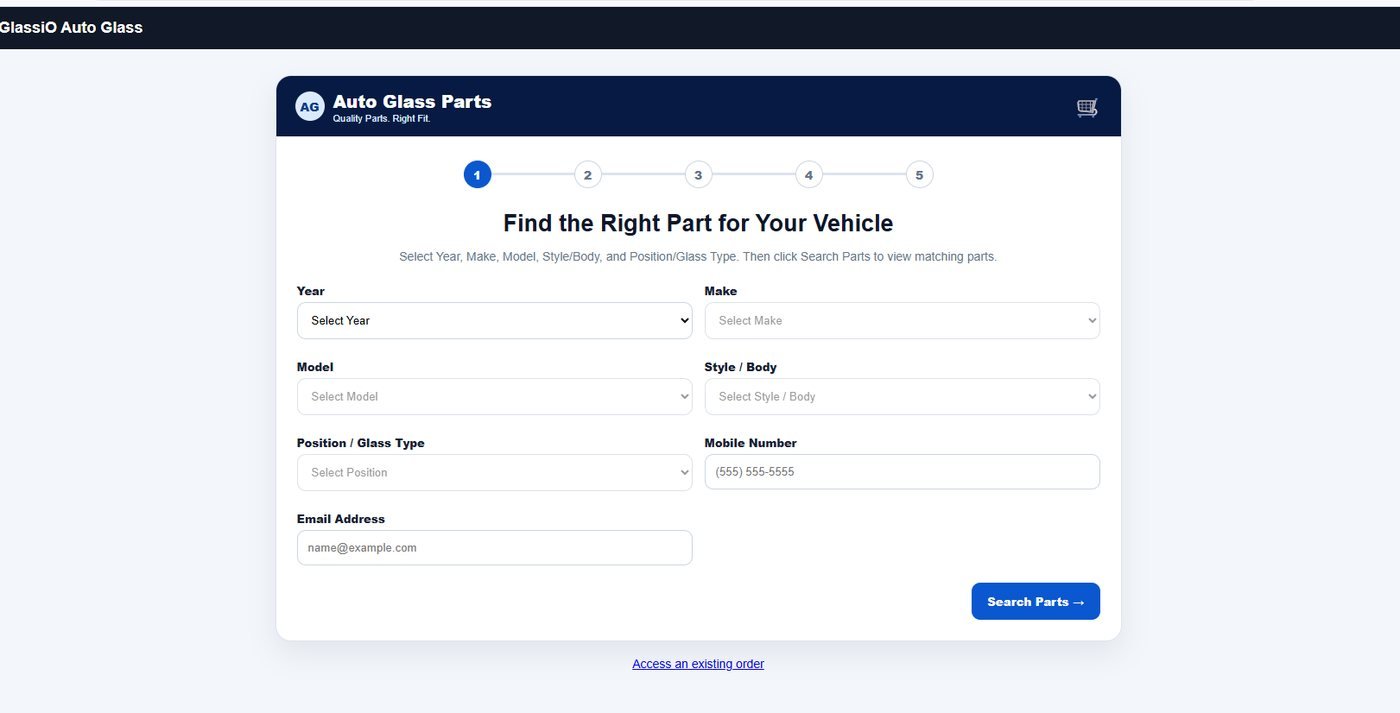
Retail parts storefront — the customer finds the part by vehicle, then checks out
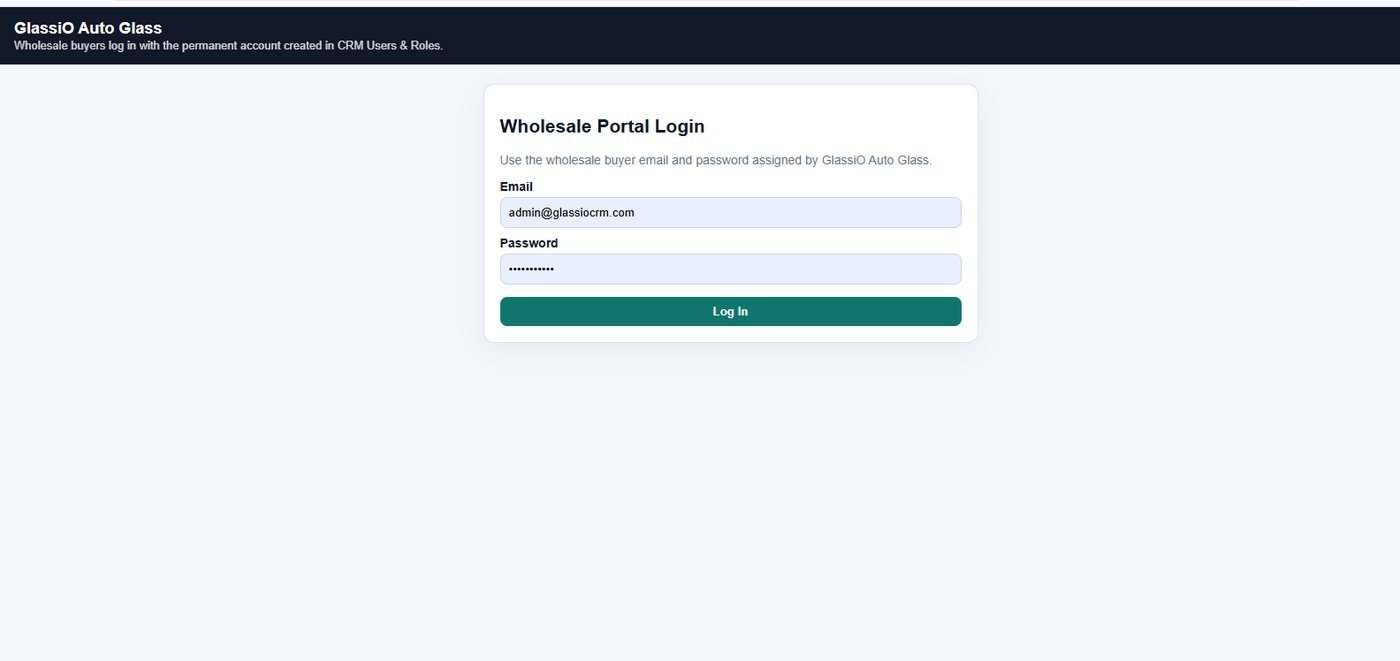
Wholesale portal — installer accounts log in to their own pricing and ordering

Retail parts storefront

A public parts store attached to your catalog.

  • Customer finds the part by vehicle or by part number
  • Prices driven by your retail pricing rules, not a fixed list
  • Availability reflected from your stock and supplier connections
  • Order placed and paid online
  • Configurable — enable it, brand it, and choose what is visible

Wholesale / distributor portal

A logged-in ordering channel for the shops you supply.

  • Installer and shop accounts with their own logins
  • Account-level pricing per customer or customer group
  • Look up parts by vehicle, VIN, or part number
  • Place orders, view order history, and reorder
  • Account status, terms, and statements visible to the buyer
  • Configurable per account — catalog visibility and pricing tier

Account pricing tiers

One pricing model across every channel.

  • Customer-group rates shared with the quote engine
  • Contract pricing for fleet and insurance accounts
  • Margin protection applied consistently, however the order arrives

Order flow

A web order behaves like any other order.

  • Orders drop into fulfillment and purchasing
  • Stock reserved or sourced from a supplier
  • Invoiced and reported in the same books as installation work
Pillar 06

Run, measure, and control the whole system

The parts of the platform nobody demos but everybody depends on: getting paid, closing the books, seeing the numbers, controlling who can do what, and knowing the data is safe.

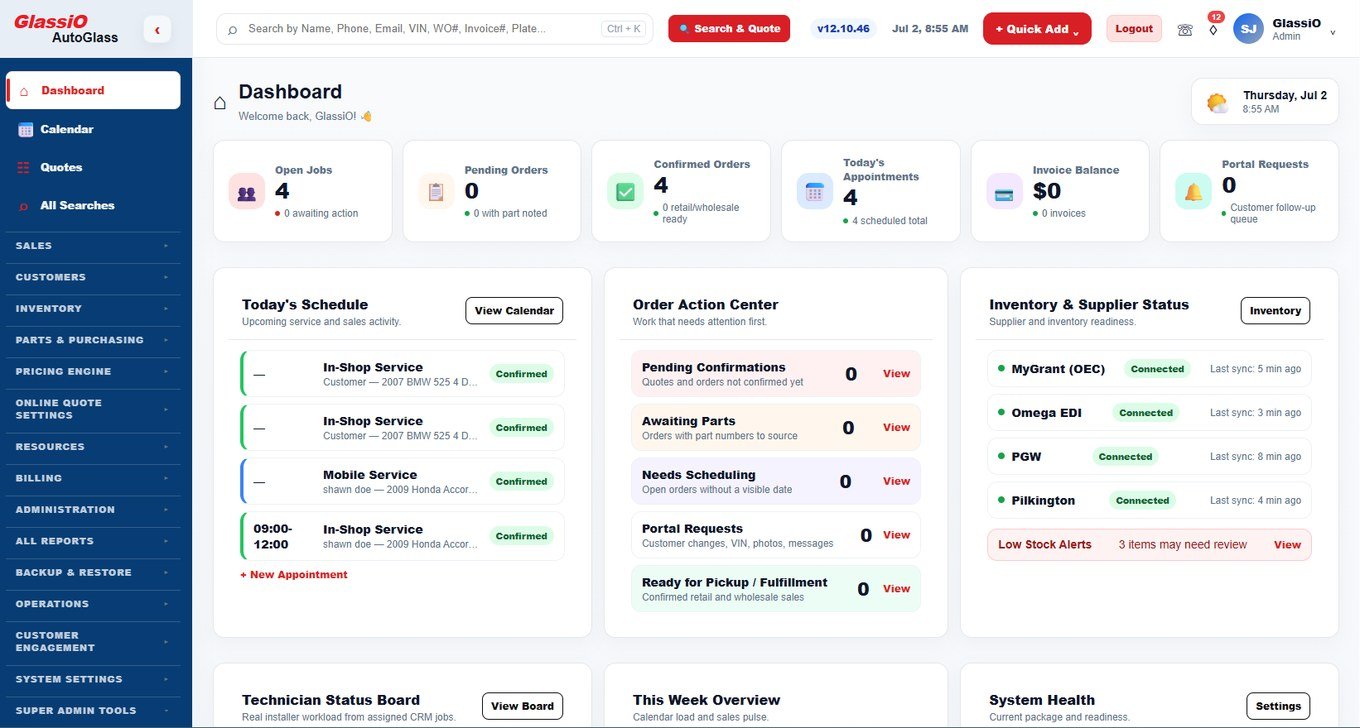
Operational dashboard — the numbers the owner opens first

Invoicing & payments

Billed from the numbers you quoted.

  • Invoice generated on job completion
  • Card payments and text-to-pay
  • Configurable tax by location
  • Balances, partial payments, and receipts

QuickBooks connection

Stop re-typing the books.

  • Customers, invoices, and payments synchronized
  • Accounts and item mapping you control
  • Sync history and error visibility instead of silent failures

Reporting

The numbers, without exporting to a spreadsheet first.

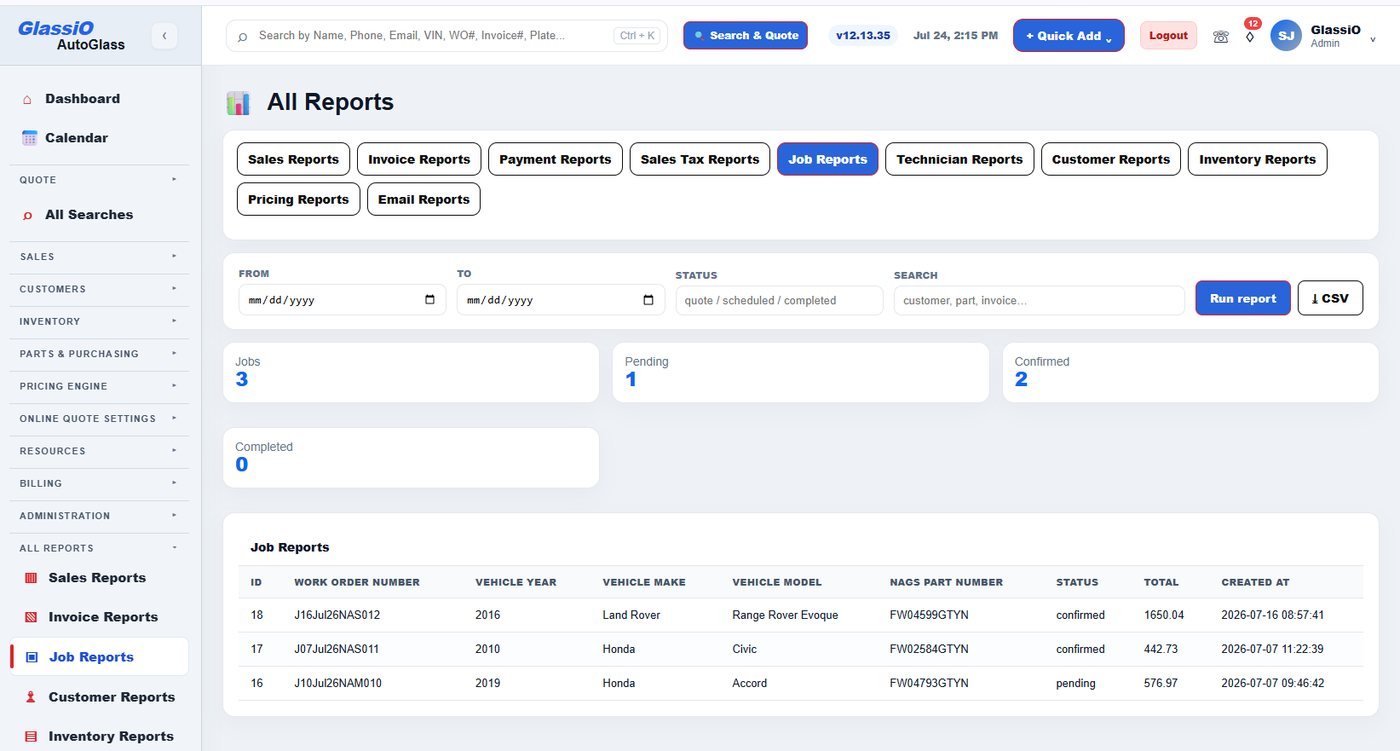
  • Dashboard KPIs on revenue, jobs, and conversion
  • Sales, invoice, and payment reports
  • Technician workload and productivity
  • Quote-to-job conversion by channel and source
  • Inventory and purchasing reporting
  • Export for anything you want to slice yourself

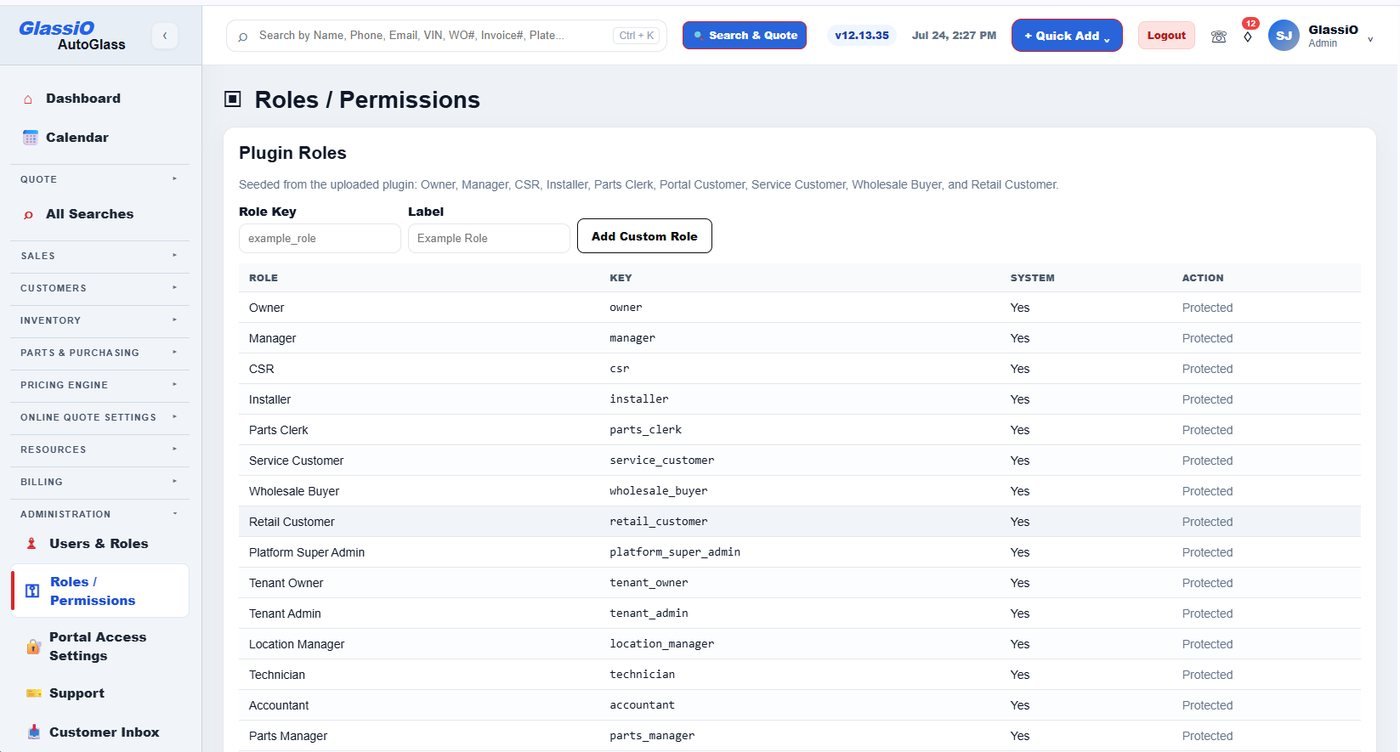
Users, roles & permissions

Every role sees only what it should.

  • Granular role-based permissions across every module
  • Per-user access control and account lifecycle
  • Two-factor authentication
  • Audit trail on sensitive actions

Appearance & settings

Make it look like your business.

  • Logo and brand colors across the CRM
  • Branded quotes, invoices, and printed documents
  • Customer portal and quote page styling
  • Business rules, tax, service areas, and hours configured per location

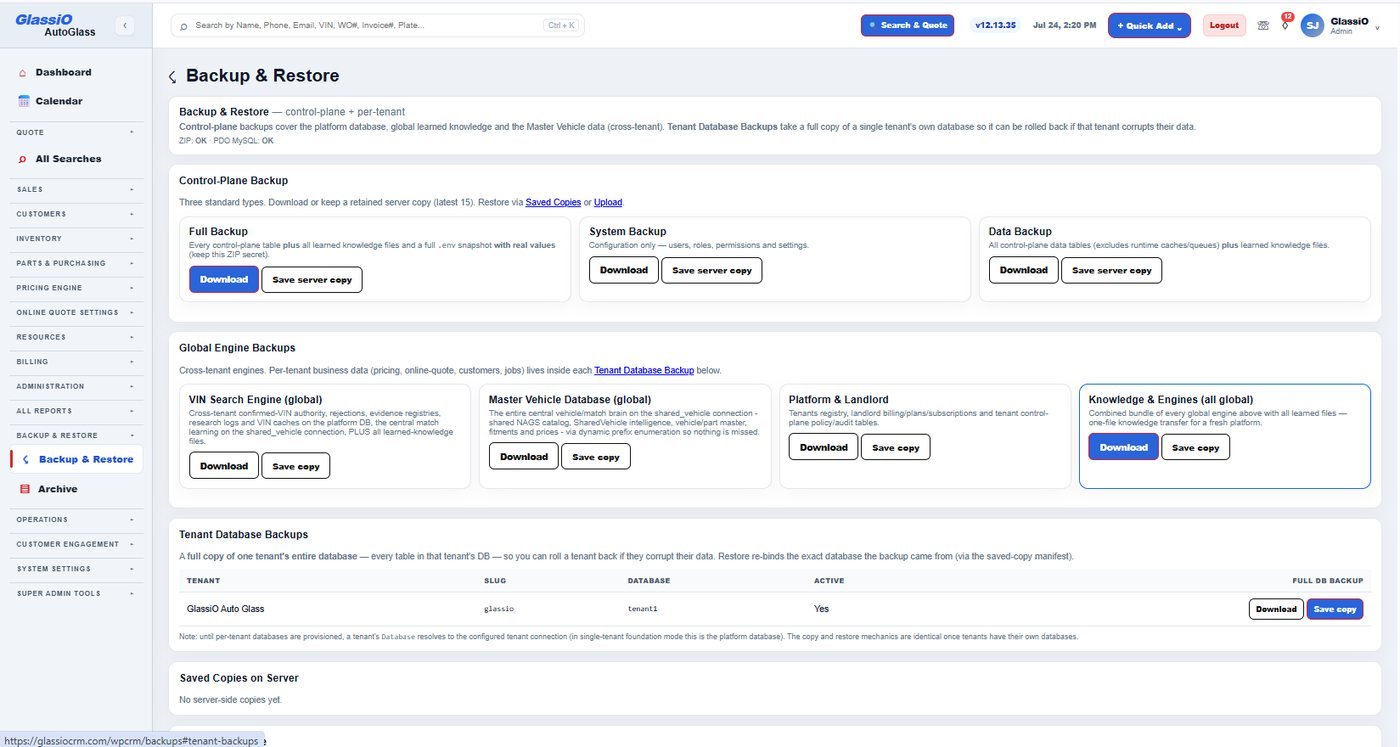
Backups & restore

The safety net you hope never matters.

  • Scheduled automatic backups
  • Off-site backup storage
  • Download a backup whenever you want a copy
  • Restore from a chosen point
  • Backup status visible so you know it actually ran
All Reports — sales, invoice, payment, tax, job, technician, customer, inventory, pricing, and email
Backup & Restore — full, system, and data backups with server copies and restore
Roles and permissions — owner, manager, CSR, installer, parts clerk, wholesale buyer, retail customer
How it connects

One path from inquiry to reporting

Every stage reads the record the previous stage wrote. Nothing gets re-keyed, and nothing gets lost between systems.

  1. 1InquiryCall, website, or marketplace
  2. 2VehicleVIN or plate resolved
  3. 3QuotePriced from cost and rules
  4. 4LeadSaved and followed up
  5. 5ScheduleBooked to bay or route
  6. 6PartsReserved or ordered
  7. 7InstallDocumented by the tech
  8. 8InvoiceBilled and synced
  9. 9ReportRolled up and measured
The difference

Generic business software vs. Glassio

Most of what an auto glass business does has no equivalent field in a general-purpose CRM.

CapabilityGeneric CRMGlassio
Vehicle identificationYear / make / model listVIN and plate decode with feature detection
Part selectionBroad glass categorySpecific part matched on evidence
Pricing basisStatic price tableSupplier cost, labor, ADAS, and your margin rules
Online quotingContact formPriced, bookable quote with service-area logic
Unfinished quotesLostCaptured and re-engaged automatically
Quote abuseWide openTracking, rate limiting, and blocking
Field documentationPhotos texted to the officePre-work and post-install capture on the job record
InventorySeparate spreadsheetReserved against the scheduled job
PurchasingPhone and supplier websitesDirect ordering with live cost inside the job
Parts salesNot supportedRetail storefront and wholesale portal on the same catalog
AccountingManual re-entryQuickBooks sync
Data safetyWhatever the host doesScheduled backups, off-site copies, restore
Knowledge captureOne-time lookup, nothing retainedSearch history, confirmed fitments, and evidence kept for next time
Compliance & ADAS recordsTracked outside the system, if at allCalibration and documentation captured against the job
Built for

The same platform, configured to your model

Modules are enabled per business, so the system matches how you actually operate.

Mobile installers

Route-based scheduling, field documentation from the phone, and quoting that works from the driveway.

Auto glass shops

Bays, technicians, inventory, purchasing, invoicing, and an online quote that fills the schedule.

Multi-location operators

Shared catalog and pricing rules, per-location stock and settings, consolidated reporting.

Distributors & wholesalers

A wholesale portal for the shops you supply, account pricing, and EDI-connected purchasing.

See solutions by business type View pricing

Questions

Frequently asked

Is the retail storefront and wholesale portal included or configured separately?

They are configurable modules, the same way the online quote is. You turn them on, choose which catalog and pricing rules each channel can see, and brand them to your business. Retail customers and wholesale accounts both look up parts and place orders themselves; those orders arrive in the same fulfillment and purchasing pipeline as work you book internally.

Do I have to use every part of the platform?

No. Glassio is composed per business. Turn on the modules you need now and add the rest later — the data stays in one system either way.

Where does the pricing actually come from?

Configured supplier cost and reference pricing, run through your own labor, calibration, materials, mobile, tax, and margin rules. Pricing profiles let an online retail lead, a wholesale account, and an insurance job each follow different math without maintaining three systems.

What does the technician actually do in the field?

Opens the job on a phone or tablet, captures pre-work photos and the VIN, completes the install, captures post-installation photos and the part used, and takes the customer signature. It attaches to the job record the office and the customer are already looking at.

Can customers see their own job?

Yes. The customer portal gives them a secure login to check status, review the quote, request a reschedule, upload photos, submit or correct a VIN, and see their service history — instead of calling your office for each of those.

How does reverse part lookup help day to day?

You start from a part number instead of a vehicle: identify what is on the shelf, check what a supplier is offering you, confirm a cross-reference, or answer a caller who only has the number from an old invoice.

Does it connect to QuickBooks?

Yes — customers, invoices, and payments sync, with the account and item mapping under your control.

What about EDI?

Inbound supplier and payer documents are parsed and matched to the orders and invoices they belong to, and supplier connections are managed inside the platform.

Who can see what?

Role-based permissions run across every module, with per-user access, two-factor authentication, and an audit trail on sensitive actions.

What happens to my data?

Backups run on a schedule, copies can be stored off-site, you can download one whenever you want, and you can restore from a chosen point. Backup status is visible so you are never guessing whether it ran.

See the whole system in one sitting

A live demo walks a real job from the first website visit through quoting, scheduling, installation, invoicing, and reporting — using your own business model.